

Multi-campus scheduling means building one semester, and one degree plan, from classes that live on more than one campus. The students who do it well treat the plan as a map of requirements, campuses, terms and travel time, then check it against the official rules before registering. We built Univyze around that idea: a planning tool that links your degree requirements to real course offerings, so the plan you bring to your advisor is already thought through.
TL;DR
- Every university sets its own multi-campus rules. Expect to need permission from the other campus and your advisor, and expect deadlines.
- Not every course is offered on every campus or every term, so match each requirement to a campus and a term before you commit.
- Travel time is a real schedule conflict. Plan it the way you plan class time.
- A change of major or one closed class can reshuffle the whole plan, so keep it a living document and re-check it each term.
- Univyze is a planning aid. Your official degree audit, catalog, registrar and advisor have the final word.
Table of Contents
- What multi-campus scheduling actually means
- Start with requirements, not with the course list
- Match each requirement to a campus and a term
- Treat travel time as a conflict
- Sequences and prerequisites decide the order
- When your major changes or a class disappears
- Tracking progress, for students and parents
- A repeatable routine for each term
- Why we plan this way
- Where Univyze fits
- FAQ
- Sources
What multi-campus scheduling actually means
The phrase covers several situations. You might attend a state university with a main campus and regional campuses. You might be at a consortium of nearby colleges. Or you might start at a regional campus and move to the main one later. In each case, the same question applies: which requirement gets met where, and when?
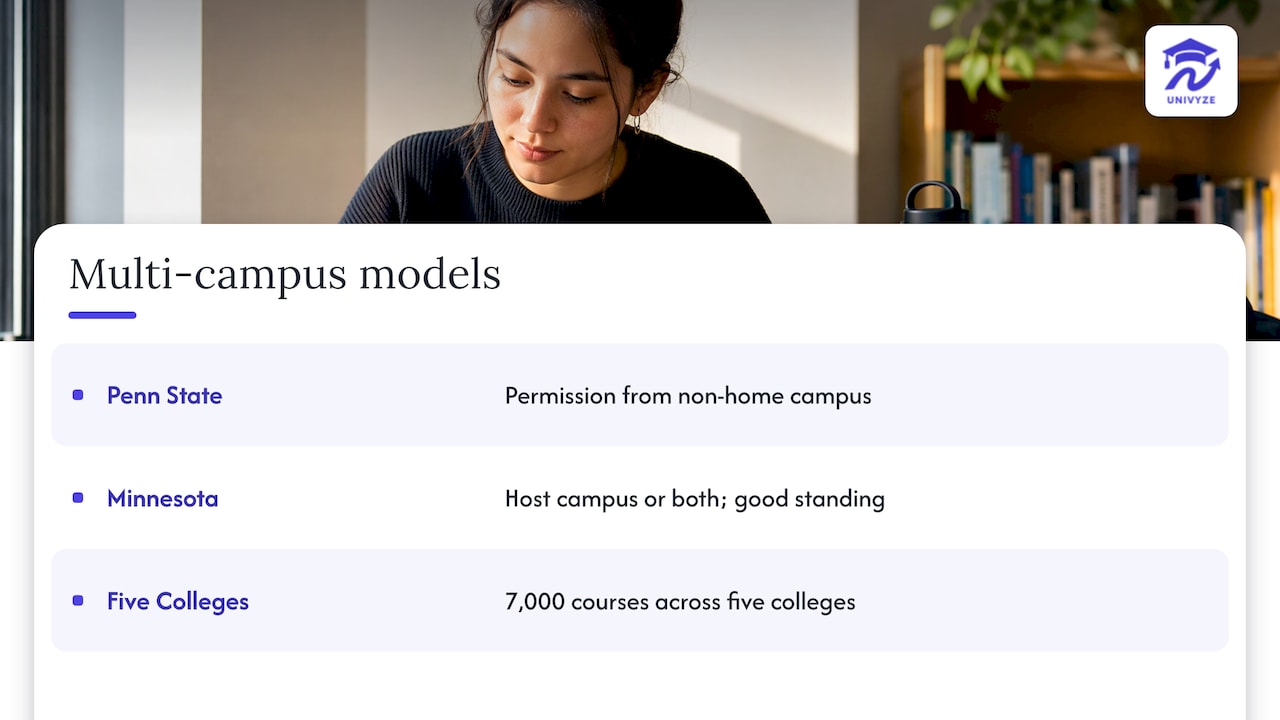
Universities define this differently. Penn State’s registrar describes multiple-campus registration as enrolling at your assigned home campus and another Penn State campus in the same semester or session. You need permission from the non-home campus, and if you plan to take most of your credits elsewhere, you must request a temporary change of campus.
The University of Minnesota calls its version Multi-I enrollment. Students in good standing can take courses at another system campus, either at the host campus only or at both campuses. While you are enrolled, financial aid and your degree status at the home campus are maintained, and the courses count toward your GPA and appear on your transcript.
Consortium models exist too. The Five Colleges in Massachusetts say their cross-registration system gives students a choice of 7,000 undergraduate courses across five institutions, with some restrictions and a strong recommendation to plan ahead.
The takeaway for a freshman or a parent: there is no single national rule. Find your school’s registrar page on multiple-campus or cross-registration enrollment before you build anything.
Start with requirements, not with the course list
The most common mistake is browsing classes first and checking requirements second. Reverse it.
- List what your major, minor and general education require.
- Mark which requirements have a limited set of courses, and which courses are offered only on certain campuses.
- Only then pick terms and campuses.
Ohio State’s guidance on planning your coursework gives a useful priority order. Courses required for the major or general education come first, then those for a minor, certificate or second major, then those that support graduate-school plans. It also says to check whether a course is offered only in specific semesters, whether it is part of a sequence or a prerequisite for a later course, and whether your credits add up to graduation in eight semesters. Students typically take about 15 credit hours a semester.
That 15 is not arbitrary. The University of Pittsburgh’s degree planner guide notes that 12 credits per semester is the minimum full-time load, while 15 credits per semester is the minimum needed to reach 120 credits in four years. If a multi-campus semester leaves you at 12, the plan may need a summer term or a heavier semester later.
Match each requirement to a campus and a term
Here is where multi-campus planning gets hard. A course that looks available may be offered on a different campus than yours, in a different term, or only to students who meet certain eligibility rules.
Ohio State notes that some courses are not offered on every campus. Students on the Columbus campus may be closed out of regional-campus classes, and regional-campus students must meet campus-change eligibility to register for Columbus classes. It also warns that summer courses at other institutions may not transfer as credit for the course you intend, so finding the right course takes advance planning.
Many schools now give you planner tools for this. Pitt’s degree planner lets you filter courses by campus, academic career, prerequisites and typically offered term, set a maximum number of units per term, and move requirements into terms. Ohio State’s Buckeye Degree Planner FAQ says its planner shows terms a course is likely to be offered, the campuses it is offered on, instructors, prerequisites, credit hours and attributes. It does not show remaining seats or waitlist status, so a plan is a starting point and not a reservation.
Cuyahoga Community College’s Grad Plan FAQ shows how far these tools can go. Students set target credits per term, select or deselect specific campuses, block off days and times so only fitting classes are recommended, and click Optimize to refresh recommendations when placement scores, prerequisite overrides or completed coursework change.
Those are the questions a good plan should answer for you:
| Question | Why it matters across campuses |
|---|---|
| Which campus offers this required course? | A requirement may be met only at one location. |
| Which terms is it typically offered? | A missed fall offering can push a course back a full year. |
| What are the prerequisites? | A prerequisite taken on another campus must still count. |
| Am I allowed to enroll there? | Many schools require permission or eligibility. |
| How long is the trip between classes? | Back-to-back classes on two campuses can be impossible. |
Univyze is built to answer the first three automatically in one dashboard: it connects your degree requirements to real course offerings and lays out a term-by-term plan. You still confirm campus permissions and final eligibility with your school.
Treat travel time as a conflict
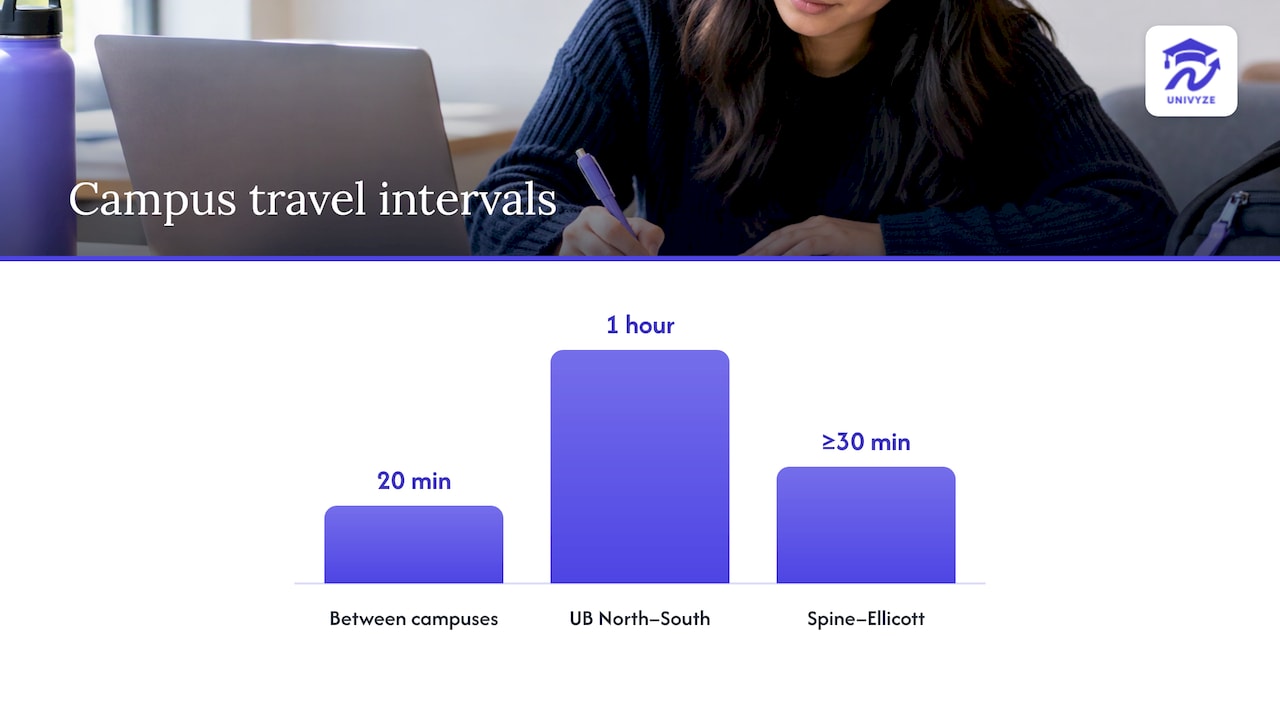
A timetable can look clean on screen and still fail in real life because it asks you to be on two campuses 20 minutes apart. The University at Buffalo gives students concrete numbers in its registration guidance: allow one hour of travel time between its North and South campuses, and at least 30 minutes between the North Campus Spine and the Ellicott Complex. It also recommends using its schedule builder to validate courses for time or requisite conflicts.
If a true overlap does happen, schools handle it narrowly. Rutgers’ Mason Gross School of the Arts says undergraduates blocked by the registration system from enrolling in two conflicting courses must request an advisor override, with written approval from one or both instructors for late arrival or early departure. Overrides are approved only for slight overlaps caused by travel time, not full meeting-time conflicts, and students are told to register for the class more likely to fill first while awaiting approval.
For a deeper look at the kinds of collisions you may run into, see our guide to types of college schedule conflicts. If you are also juggling a licensing exam on top of a full course load, building a 12-week study plan around your class and travel blocks works the same way: put the fixed commitments down first, then fit the flexible ones around them.
A quick travel check
Before you lock in a semester, run through this:
- Is there a gap of at least the official travel time between any two classes on different campuses?
- Do you have a way to get there (shuttle, bus, car), and does it run at those times?
- Have you left room to eat and get to the next room?
- Is there a backup if the early class fills and you have to take a later section?
Sequences and prerequisites decide the order
Across campuses, the order of classes matters more than the count. If course B requires course A, and A is offered only in the fall at one campus, then missing that fall can cost you a year. That is how students end up with an extra semester they never planned for.
Write down the chains in your major, with the earliest possible term for each link. Our checklist on prerequisites and corequisites walks through how to spot them. If a prerequisite is the only thing stopping you, a short, specific request can help, and we explain how to write one in our prerequisite override request guide.
AP credit, dual enrollment, transfer credits and summer sessions are the tools that give you slack. They can free up a term or lighten a heavy one, but each school decides what it accepts, so confirm with the registrar before you count on any of them.
When your major changes or a class disappears
Plans break. A closed section, a new major or a failed course can ripple through every later term. What matters is how fast you can see the effect.
Ithaca College’s advising handbook says advisors should run a degree audit What-If analysis with the student to show the projected impact of a major change. It also notes that a change of major automatically moves the student to the current catalog year and changes all degree requirements. That is a good reason to look at the numbers before you file the form, not after.
The University at Buffalo’s guidance also reminds students that they may add, drop or change classes from the start of their enrollment appointment through the end of the drop/add period, should verify the changes were processed, and should watch continued-eligibility requirements for state and federal financial aid plus add, drop and resign deadlines.
A what-if view in Univyze lets you try a different major or a different sequence on paper first, so you walk into the conversation with options. Run it once, see what it does to your terms, then take it to your advisor.
Tracking progress, for students and parents
If you are a parent, the question is simple: is my student on track? Your school’s official degree audit is the authoritative answer. Clark University’s advising handbook describes it as matching a student’s academic history and registration against all degree requirements, refreshing each time it is viewed, and used by the Registrar for final graduation review. Students are told to review it often, especially before advising sessions ahead of registration.
Graduation timing has money attached. Ithaca’s handbook says the Registrar reviews graduation dates every term, and that once every requirement is complete, federal and institutional financial aid end. A later date means more terms to pay for, which is why we wrote about why tuition rises with extra semesters.
The audit tells you where you stand. A planner tells you what to do next. We explain the difference in from degree audit to planner. With Univyze, families can have shared visibility into progress, so a parent is not asking for a screenshot at midnight before registration opens.
A repeatable routine for each term
- Read your school’s multi-campus policy. Find the registrar page, note permission steps, deadlines and any limits.
- Pull your requirements. Use your official degree audit and catalog as the source of truth.
- Place the hard requirements first. Sequenced courses and ones offered once a year go into terms before anything else.
- Choose campuses per course. Group classes by campus on the same days where you can.
- Add travel time. Treat it as a class.
- Build a backup section for each tight class, since seats and waitlists are not shown in most planners.
- Bring the draft to your advisor. Our piece on course scheduling strategies shows why arriving with a draft makes the meeting more useful.
- Register as soon as your window opens, then verify. Confirm every change was processed.
- Re-check each term. Update the plan after grades, major changes and new credits.
Penn State’s registrar advises students to consult their adviser and get non-home-campus permission, and notes that most campuses begin accepting such requests one week before the semester starts. Look for the equivalent date at your school, because it sets how early you can finalize anything.
Why we plan this way
Most students we hear from do not struggle with effort. They struggle with a picture that is in five places: a catalog PDF, an audit, a course search, a map and a group chat. Multi-campus schedules make that worse, because every choice has a location and a travel cost attached.
Our view is that a plan should be one clear page. It should show your requirements next to real course offerings, lay out the terms, and let you ask “what if I switch majors?” or “what if I use my AP and dual-enrollment credit?” without starting over.
It should also be shared. A student, a parent and an advisor looking at the same plan have better conversations than three people holding three versions. Ithaca College’s handbook calls planning a shared exercise, and we agree.
Univyze is a planning tool. It does not replace your official degree audit, your registrar or your advisor, and we say so plainly. What it does is help you arrive at those conversations prepared.
Ryan
Where Univyze fits
Univyze gives you a dashboard that connects degree requirements to real course offerings, builds a term-by-term plan, supports what-if scenarios for major or minor changes, and keeps AP credit, dual enrollment, transfer credits and summer sessions in view. Families and advisors can share the same progress picture.
The Starter plan is free ($0). Paid plans are listed at univyze.com: Core is $359.40 per year or $1,095 one-off, Plus is $599.40 per year or $1,795 one-off, and Pro is $1,199.40 per year or $2,895 one-off. If you want to see how it would handle your own campuses and terms, join the Univyze waitlist.
FAQ
Can I take classes at two campuses in the same semester?
Often yes, but it depends on your school. Penn State and the University of Minnesota both allow it with conditions such as permission from the host campus and good academic standing. Check your registrar’s multiple-campus or cross-registration page and talk to your advisor first.
Will taking a class at another campus affect my financial aid or GPA?
At the University of Minnesota, financial aid and home-campus degree status are maintained during Multi-I enrollment, and the courses count toward your GPA and appear on your transcript. Policies differ elsewhere, so confirm with your financial aid office and registrar before you enroll.
How much travel time should I leave between campuses?
Use your school’s own numbers. The University at Buffalo, for example, advises one hour between its North and South campuses. If your school does not publish a figure, test the trip yourself at the time of day you would actually make it.
Is Univyze the same as my official degree audit?
No. Your official degree audit, catalog, registrar and advisor are the authority on what counts toward your degree. Univyze helps you plan smarter around them, with term-by-term planning and what-if scenarios you can bring to your advisor. To try it on your own plan, join the Univyze waitlist.
Sources
- Multiple Campus Registration, Penn State Office of the University Registrar
- Register at multiple UMN campuses, Twin Cities One Stop
- Cross-Registration, Five Colleges
- Planning Your Coursework, Ohio State Office of Undergraduate Education
- Student AAR and Degree Planner Guide, University of Pittsburgh
- Buckeye Degree Planner FAQs, Ohio State
- Grad Plan Student FAQs, Tri-C
- Prepare for Registration, University at Buffalo
- Undergraduate Students, Rutgers Mason Gross School of the Arts
- Faculty Advising Handbook 2026-2027, Ithaca College
- Academic Advising Handbook for Students, Clark University