
Your clearest path from today to graduation.
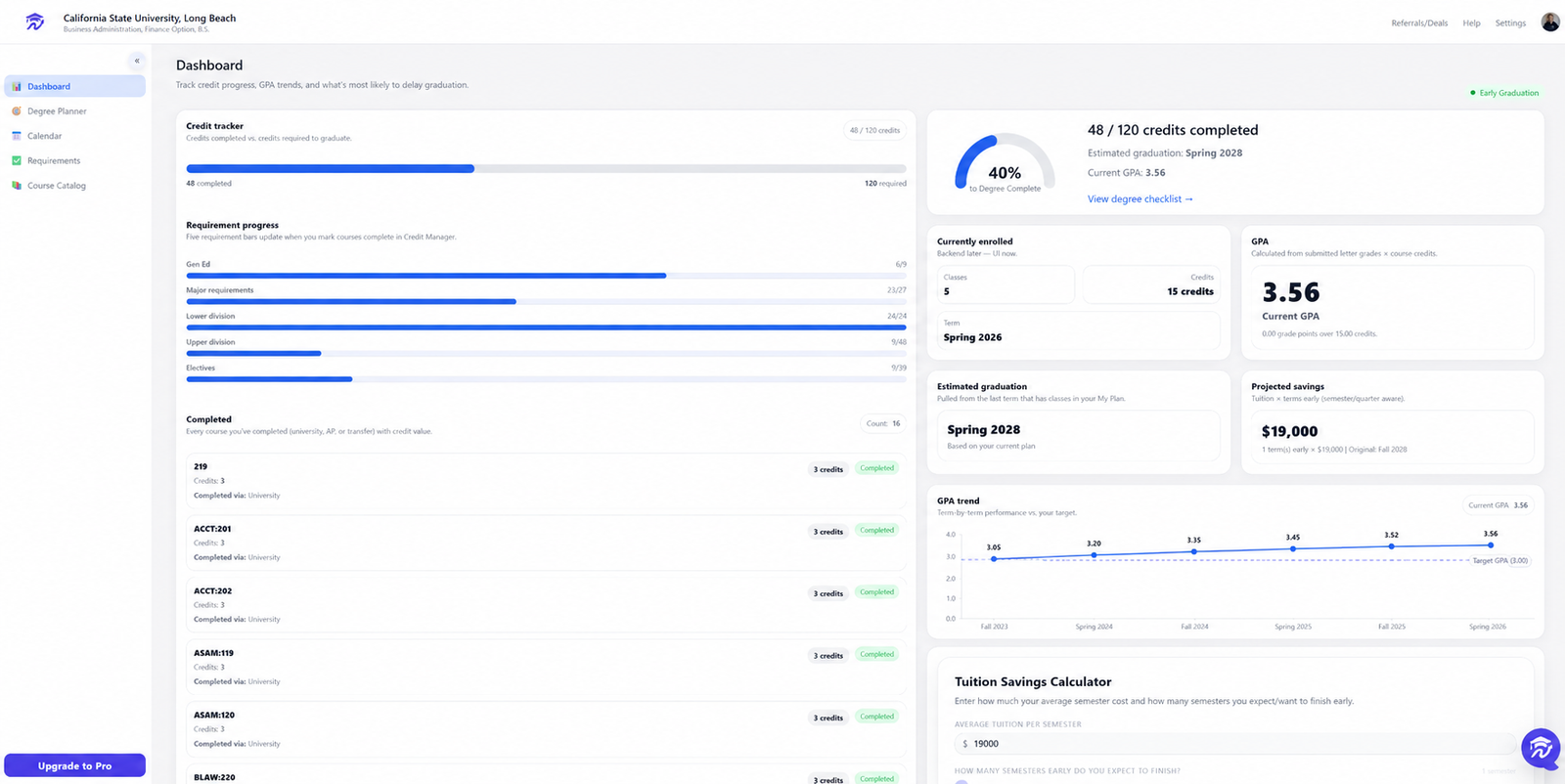
Univyze turns your college, major, completed credits, transfer and AP work, class preferences, and graduation goals into a visual degree plan you can actually use every semester.
From sign-up to a smarter plan in four steps.
Univyze collects information that normally lives across degree audits, spreadsheets, course catalogs, and advisor notes, then organizes it into one living dashboard.
Create your profile
Add your college, major, concentration, minor, graduation goal, and preferred academic pace.
Add your credits
Include completed courses, AP credit, dual enrollment, transfer work, and current enrollment.
Build your plan
Generate or manually adjust a term-by-term roadmap that checks requirements and course sequencing.
Use it every term
Select classes, confirm enrollment, update grades, and keep your plan current as goals and circumstances change.
Every page has a clear job.
See how students use Univyze to understand progress, plan future terms, choose classes, build schedules, and identify faster routes to graduation.
Build a visual degree plan.
The Degree Planner gives students a flexible roadmap across every term, with plan tabs, editable course placement, completed classes, credit totals, and requirement checks.
- ✓ Create a complete roadmap instead of guessing one semester at a time.
- ✓ Compare draft plans before changing majors, adding a minor, or pursuing an earlier graduation date.
- ✓ Identify missing requirements, prerequisite concerns, and credit gaps earlier.
Choose classes with context.
Class Selection helps students explore available courses, understand how each option fits the degree plan, and choose appropriate sections for the current or upcoming term.
- ✓ Find courses that move the degree plan forward instead of searching the catalog without direction.
- ✓ Review course details, available sections, and class times before registration.
- ✓ Save the strongest options and add custom class times when necessary.
Turn selected classes into an actual schedule.
Once courses are selected, Univyze helps students add the correct sections, visualize meeting times, and create a practical weekly schedule before registration is finalized.
- ✓ Move from a list of possible courses to a usable weekly schedule.
- ✓ See how class times work together before committing to a section.
- ✓ Plan around work, activities, commuting, and personal responsibilities.
See requirements without digging through audits.
The Requirements page gives students a clear checklist of what is complete, what is currently planned, what remains, and which courses can satisfy each requirement area.
- ✓ Track major, general education, elective, concentration, and total credit requirements.
- ✓ Understand what needs attention before the next registration period.
- ✓ Reduce the chance of discovering an unmet requirement close to graduation.
Update credits and grades as progress happens.
Keep completed coursework, enrolled classes, transfer work, AP credit, dual-enrollment credit, and final grades organized so the degree plan remains accurate over time.
- ✓ Mark courses complete and keep academic progress current after each term.
- ✓ Record final grades and confirm the credits that have been earned.
- ✓ Refresh GPA, completed-credit totals, and remaining requirements.
Expedite the path to graduation.
Univyze helps students explore how dual-enrollment courses can satisfy college requirements, reduce future course loads, and create a more efficient path toward an earlier graduation date.
- ✓ Search for dual-enrollment options that align with future degree requirements.
- ✓ Understand where outside coursework may fit before committing time and money.
- ✓ Compare accelerated pathways that combine dual enrollment, existing credits, and smarter sequencing.
Built to reduce expensive academic planning mistakes.
Missed requirements
Students can see what is complete, what is planned, and what still needs to be satisfied.
Bad course sequencing
Plans can account for prerequisites, current progress, and the order in which courses should be taken.
Extra semesters
Univyze makes the timeline impact of academic choices clearer before they become expensive delays.
Major changes
Students can rebuild or compare plans when switching majors, adding a minor, or testing a new path.
Transfer and credit confusion
AP, transfer, and dual-enrollment credits can be added so the plan reflects what the student has already earned.
Registration stress
Students enter registration knowing which courses matter most for their requirements and timeline.
Plan college with more confidence.
Univyze gives students and families a clearer way to understand credits, requirements, schedules, accelerated options, and the complete path to graduation.
Try It For Free →