
The rule that matters more than any other in athlete course scheduling: build your training and travel calendar first, then slot degree-applicable courses around it, and confirm every credit counts toward NCAA progress-toward-degree before you enroll. Two checks come before anything else — your credit-hour minimum and whether each course is degree-applicable. Start now by pulling your registrar degree audit or opening a Univyze dashboard and blocking the hours you cannot move.
TL;DR:
- Building the training and travel calendar first ensures courses are scheduled around fixed commitments and prevents conflicts during peak competition periods.
- Confirm that each course taken is degree-applicable and counts toward NCAA progress, with written approval from advisors and compliance officers before registration.
- Use summer, winter, or online course options strategically to avoid heavy coursework during intensive athletic seasons, after verifying transfer and applicability rules.
- Maintain a weekly schedule review and build buffers for unplanned events like travel delays or injuries to avoid last-minute conflicts and eligibility issues.
- Tools like Univyze aid in planning but do not replace official degree audits or approvals; always document approvals and verify course applicability before registering.
Table of Contents
- How Do You Build a Conflict-Free Semester Schedule?
- What NCAA Rules Affect Your Course Load?
- When Should You Use Summer, Winter, or Shared Courses?
- How Do You Merge Training, Travel, and Study Into One Calendar?
- What Tools Help You Manage Athlete Academic Planning?
- What Does a Realistic In-Season Weekly Schedule Look Like?
- What Actually Prevents an Eligibility Crisis?
- Start Planning Your Semester With Univyze
- Sources
- FAQ
How Do You Build a Conflict-Free Semester Schedule?
Athlete course scheduling works backward from what you cannot change. Your team calendar is fixed. Your class schedule is not, at least not until you register. Treat it that way from the start.
- Gather your official constraints first. Pull your enrollment status, your coach’s practice and lift calendar, travel dates for the season, and your registrar degree audit. Get your major requirements sheet too, since that determines which courses actually move you forward.
- Map non-negotiables into a weekly grid before touching classes. Block practices, lifts, travel days, and treatment or rehab windows. Everything else gets built around those fixed hours, not the other way around.
- Use accelerated terms when the fit is bad. If a required course only runs during your heaviest competition window, look at summer or winter sessions, or a course-sharing network that lets you take an equivalent class elsewhere.
- Confirm degree-applicability before you register. Not every credit-bearing course counts toward NCAA progress-toward-degree. Check with your advisor or registrar and get the approval in writing or email.
- Reserve study and recovery blocks like they’re mandatory practices. Set a fixed weekly planning review, even 20 minutes, to catch conflicts before they become emergencies.
Pro Tip: Screenshot or export your advisor’s degree-applicability confirmation every time you register. If a compliance question comes up in November about a class you added in August, you want a timestamp, not a memory.
This sequence sounds obvious once it’s written down. Most athletes do it in reverse, registering for classes that look convenient, then discovering a practice conflict in week three. Fix the order and the conflict never shows up.
What NCAA Rules Affect Your Course Load?
NCAA Division I eligibility rests on two numbers you need memorized: your credit-hour minimum and your progress-toward-degree percentage. Miss either one and you can lose a season, not just a semester.
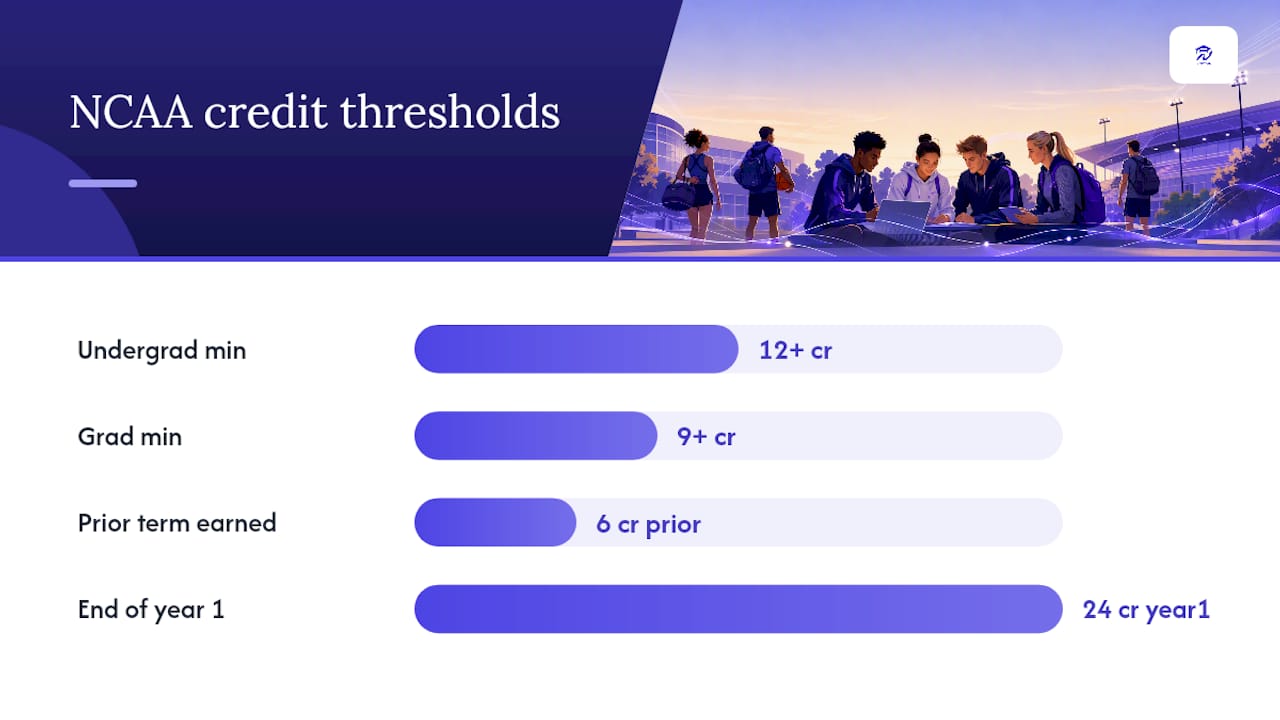
- Undergraduates must stay enrolled full-time, which the DI Progress-Towards-Degree Tip Sheet sets at 12 or more credit hours per term, with graduate athletes required to carry 9 or more.
- You also need to have earned at least six degree-applicable credits in your immediately preceding regular term, and 24 hours total by the end of your first year.
- Progress-toward-degree percentage benchmarks kick in once you declare a major, and that declaration deadline lands at the start of your third year, or fifth semester, per guidance on intent to declare a major.
- Only courses that count toward your declared degree program count toward those NCAA progress calculations. A class you love but that doesn’t apply to your major does nothing for your eligibility clock.
The numbers that matter: 12+ credits for undergraduates, 9+ for graduate students, 6 credits in the prior term, 24 hours in year one. Those four figures, straight from the DI Progress-Towards-Degree Tip Sheet, decide whether you play next season.
Your compliance office is not optional scenery here. Loop in your academic advisor and your compliance officer every time you add, drop, or swap a course, and document each approval per NCAA continuing eligibility guidance. A verbal “yeah that’s fine” from an advisor means nothing to an eligibility committee six months later.
When Should You Use Summer, Winter, or Shared Courses?
Resequencing your coursework is one of the few levers you fully control. If a required class only runs during your toughest competition stretch, don’t force it. Move it.
- Summer and winter short terms exist specifically to shift credits away from your highest-competition semesters. A three-week winter session can knock out a prerequisite that would otherwise collide with conference play.
- Course-sharing consortia, like the CIC’s online network, let you take an equivalent course through a partner institution when your own school’s version conflicts with travel. Institutions increasingly lean on these networks specifically to reduce in-season academic stress for athletes.
- Approved online options can fill the same role, provided your registrar confirms the credit transfers as degree-applicable before you enroll, not after.
The tradeoff is real. Accelerated terms compress the same material into fewer weeks, which raises weekly workload even as it lowers your semester course count. Summer sessions also usually carry a separate cost, so check your financial aid or athletic scholarship terms before committing.
Before you register for anything outside your normal term:
- Confirm with your advisor that the course is degree-applicable, not just credit-bearing.
- Get written sign-off from your compliance office if the course affects your progress-toward-degree calculation.
- Save the confirmation email or portal screenshot in one folder, not scattered across your inbox.
Skip any of those three steps and you risk a credit that doesn’t count where you needed it to.
How Do You Merge Training, Travel, and Study Into One Calendar?
The hardest part of athlete academic planning isn’t the fixed stuff. It’s the unplanned time: a delayed bus, an extra treatment session, a coach’s meeting that eats your Tuesday afternoon. Advisors who work closely with athletes consistently point to one difference between students who handle this well and those who don’t: the ones who build a visualized schedule ahead of time adjust faster than those reacting week by week.
- Set your block structure first. Training blocks, class blocks, study and recovery windows, and buffer slots for travel or treatment all get fixed positions on your weekly grid, even before you know exact assignment due dates.
- Protect your highest-focus hours for your heaviest coursework. Schedule reading-intensive or problem-set-heavy classes on your lower-training days, or during a recovery window when your legs are dead but your brain isn’t.
- Set a communication protocol before the semester starts. Tell professors up front that you’re a student-athlete with a travel calendar, and ask what pre-approval process they use for missed exams or presentations. Tell your coach the same about academic deadlines that might need a lift schedule shift.
- Run a weekly review, every single week. Fifteen minutes on Sunday night to check the coming week against your master calendar catches the conflict before it becomes a missed midterm.
- Build a “what-if” habit for the moment travel or injury forces a change. Know in advance which assignments can go asynchronous and which absolutely cannot.
Pro Tip: Send your syllabus travel dates to every professor in week one, not week eight. A professor who finds out about a road trip the night before a quiz is far less flexible than one who’s had it on their calendar since August.
What Tools Help You Manage Athlete Academic Planning?
A dynamic degree dashboard that links your actual requirements to the courses your school is offering this term solves a specific problem: it catches the moment a class you’re planning to take doesn’t actually move you toward your degree, before you register instead of after.
- A College Schedule Building Basics Checklist walks first-term students through the same gather-your-constraints sequence covered above, adapted into a printable format.
- The Overloaded Semester Guide is built for the exact situation many athletes face: too many required courses, not enough low-conflict terms to fit them.
- A “what-if” planner lets you model a major change or a travel-heavy season before it happens, rather than discovering the fallout in your next degree audit.
- Export options let you move your term plan into a standard weekly calendar app, and a shared dashboard gives parents visibility into progress without them needing your login.
Be careful with scheduling tools generally, not just this one. Some AI-generated class schedule tools build timetables without verifying your actual constraints first, which can produce a clean-looking schedule that quietly ignores a lab section or a nonstandard class length. Confirm any tool’s output against your registrar’s course listings before you trust it.
| What you need | Where to find it |
|---|---|
| Degree requirements linked to live course offerings | Univyze dashboard |
| First-term scheduling walkthrough | Schedule Building Checklist |
| Heavy-semester strategy | Overloaded Semester Guide |
| Official eligibility confirmation | Registrar degree audit and academic advisor |
Univyze is a planning aid built to make your schedule easier to see and adjust. It doesn’t replace your official degree audit, and it can’t confirm NCAA eligibility on its own. The final word always belongs to your registrar and compliance office.
What Does a Realistic In-Season Weekly Schedule Look Like?
Here’s a sample week for a Division I athlete carrying a normal course load during competition season. Adjust the specifics to your sport’s practice windows and your own class times.
| Time block | Monday/Wednesday/Friday | Tuesday/Thursday |
|---|---|---|
| Early morning | Lift (early morning) | Recovery/mobility (early morning) |
| Morning | Lecture courses | Lecture courses |
| Midday | Study block 1 | Lab course |
| Afternoon | Practice (afternoon) | Practice (afternoon) |
| Evening | Study block 2, treatment | Study block 2 |
Heavy reading courses go on the lighter training days, where the mental bandwidth still exists after class. Lab sections get built around fixed practice windows, since labs rarely move but practice times sometimes do with enough notice. When travel hits without warning, know in advance which professors have pre-approved asynchronous work, and notify them the moment your itinerary is confirmed, not the night before you leave.
Swapping a course mid-year takes three steps: check degree-applicability with your advisor, confirm the new course’s meeting time against your team calendar, and get compliance sign-off in writing before you drop the old one.
What Actually Prevents an Eligibility Crisis?
An advisor who works closely with athletes told a version of this story that shows up again and again: a track athlete building her own combined dashboard, semester by semester, caught a scheduling gap that would have left her one degree-applicable credit short of the third-year threshold. She fixed it that same week instead of during finals. The habit that made the difference wasn’t a spreadsheet. It was a standing weekly check-in with both her coach and her advisor on the same calendar, using planning resources built for exactly that kind of cross-checking.
— Ryan
Start Planning Your Semester With Univyze
Univyze gives you one dashboard that ties your actual degree requirements to the courses your school is offering right now, instead of leaving you to cross-reference a PDF catalog against a course search tool every registration cycle. For a student juggling practice schedules, travel, and a major that might still change, that’s the difference between finding out about a scheduling problem in October and finding out in April, right before your compliance office does.
A dashboard builds your plan term by term, factors in AP credit, dual enrollment, and transfer credits, and lets you run “what-if” scenarios before you commit to a major change or an overload semester. Parents get their own visibility into progress without needing your login. None of this replaces your official degree audit or or your advisor’s sign-off. Treat Univyze as the tool that makes those conversations faster and better informed, not as the final word on your eligibility. If you’re building a semester plan right now, check the pricing options and join the Univyze waitlist to get access as new features roll out.
Sources
- DI Progress-Towards-Degree Tip Sheet
- CIC online course-sharing consortium
- Athletics: Intent to declare major guidance
- NCAA continuing eligibility (UNLV guidance)
- How course sharing supports student-athletes (Acadeum)
FAQ
What Is a Good Training Schedule for a College Athlete?
A workable training schedule fixes practices, lifts, and recovery windows first, then builds classes around them, with lower-intensity training days reserved for your heaviest coursework. The exact hours vary by sport and season, but the sequencing principle holds across every Division I program.
How Many Hours Do D1 Athletes Practice a Week?
Practice and competition hours vary significantly by sport, season, and NCAA countable-hours rules, and your compliance office can confirm the specific weekly limit that applies to your team. Build your class schedule around whatever your coach’s official calendar states, not an estimate.
What Credit Load Do I Need to Stay NCAA Eligible?
Undergraduate athletes need at least 12 credit hours per term to maintain full-time enrollment, plus six degree-applicable credits in the preceding regular term, according to the DI Progress-Towards-Degree Tip Sheet. Graduate athletes need 9 or more credit hours.
When Do I Need to Declare My Major?
You need to declare a major by the start of your third year, or fifth semester, when percentage-of-degree requirements begin applying to your progress-toward-degree calculations.
Can Univyze Guarantee My Courses Count Toward Eligibility?
No. Univyze helps you visualize which courses fit your degree plan and flags potential conflicts, but only your registrar and compliance office can officially confirm degree-applicability and NCAA eligibility.