
Yes, families can see a student’s degree plan, but only when the student grants access through the school’s proxy or delegate system, or through a signed FERPA release. There is no automatic parent login. The dependent exception under FERPA exists on paper, but most colleges skip it and rely on student-controlled portals instead. Shareable items usually include degree progress, schedules, and unofficial transcripts; billing often lives on a separate system with its own permissions.
TL;DR:
- Proxy access is controlled entirely by the student through the school’s portal and must be set up individually for each category of information to be shared.
- Most colleges separate academic records from financial information, meaning access to one does not automatically include the other, often requiring multiple portals.
- FERPA grants parents access only if the student explicitly shares records via proxy or if they are claimed as dependents on tax returns, with most schools avoiding dependence verification.
- Granting, modifying, or revoking parent access typically takes less than ten minutes through straightforward steps in the student portal, with instant updates once changed.
- Using shared dashboards as ongoing communication tools helps families prevent surprises and makes scheduling and registration easier, but portal access alone does not authorize direct contact with university staff.
Table of Contents
- How University Proxy and Delegate Access Portals Work
- What FERPA Actually Allows Parents to See
- How Do You Grant, Scope, or Revoke Family Access?
- Best Practices for Families Sharing a Degree Plan
- A Family Dashboard Built Around What Students Control
- Why Student-Controlled Access Beats the Alternative
- Sources
- FAQ
How University Proxy and Delegate Access Portals Work
Every campus names this feature differently. Some call it “proxy access,” others “InfoShare,” “Guest Access,” or “Release of Education Records.” The mechanics are nearly identical everywhere, and the student always starts the process.
A student logs into the school’s main portal, usually the same one used for registration and grades, and finds a tab for adding a designee. From there, the student picks exactly what to share. Most systems break this into categories rather than an all-or-nothing switch.
- Academic records: unofficial transcripts, grades, and enrollment verification
- Degree progress: completed requirements, remaining courses, and academic standing
- Schedule details: current and upcoming term class times
- Holds and alerts: registration blocks or advising flags
Once the student selects the categories, the parent gets an invitation, usually a PIN or activation email, and sets up a login of their own. That login is scoped to only what the student checked off. Boston University’s registrar lists unofficial transcripts, schedules, grades, and degree progress as commonly shareable items, while noting that financial and billing information typically sits on a separate system entirely. That separation trips people up constantly. A parent who can see a full course schedule might have zero visibility into the tuition balance, and vice versa, because the two portals answer to different offices with different rules.
What FERPA Actually Allows Parents to See
The Family Educational Rights and Privacy Act hands control of education records to the student the moment they enroll in a postsecondary program, regardless of age or who’s paying the tuition bill. Parents don’t inherit automatic rights just because they footed the bill for freshman year.
There’s a narrow exception. Schools may disclose records to parents of a student claimed as a dependent on federal tax returns, under IRS rules. In practice, most colleges avoid leaning on this exception for everyday portal access, according to UniversityParent’s FERPA release guide, because verifying dependent status case by case is messier than just letting the student manage sharing directly.
A few other pieces matter here:
- Directory information (name, major, enrollment dates) can often be released without consent unless the student opts out.
- Education records (grades, transcripts, disciplinary files) require consent or a listed exception.
- Emergency and health/safety situations allow disclosure without consent when there’s an articulable threat.
- Institutions must let students inspect their own records within 45 calendar days of a request, a timeline set directly by federal FERPA guidance.
Most schools default to student-scoped proxy systems for one practical reason: it keeps the student in control without forcing the registrar’s office to adjudicate who counts as a dependent. That design choice shapes almost everything about how family access to plans actually works on campus.
How Do You Grant, Scope, or Revoke Family Access?
Setting this up usually takes less than ten minutes once you know where to look. Here’s the general path, though exact button names vary by school:
- Sign into your student portal and search for “proxy access,” “guest access,” or “release of records” (check the registrar’s site if you can’t find it).
- Add a designee by entering a parent’s email address or generating a PIN they’ll use to activate their own login.
- Select exactly what to share, item by item: degree progress, class schedule, unofficial transcript, holds, or grades.
- Send the invitation. The parent receives an email or PIN, sets a password, and gets a view-only dashboard limited to whatever you checked.
- Test it yourself if possible, or ask the parent to confirm what they can and can’t see, so there are no surprises at registration time.
If a parent activates their account but doesn’t see degree progress or a transcript, the fix is almost always the same: the student needs to go back into the authorization panel and toggle that specific checkbox, since each item maps to its own permission, as Colgate University’s InfoShare guidance explains.
Narrowing access later is just as simple; uncheck a category, and it disappears from the parent’s view almost immediately. Revoking access entirely usually means removing the designee from the same panel.
Pro Tip: If a parent needs to actually call or email an advisor about your schedule, portal access alone won’t cut it. That requires a separate signed FERPA release on file with the registrar, not just an activated proxy account.
Best Practices for Families Sharing a Degree Plan
Shared access works best when both sides treat it as an ongoing conversation, not a one-time setup task.
- Set a review rhythm. A quick quarterly check, especially before registration windows open, helps catch blocked prerequisites or overloaded terms before they become a problem.
- Scope permissions narrowly. Share only what’s genuinely useful, and revisit those settings each year or after a major change, like switching majors.
- Use the dashboard to spot problems early, then bring specific questions (a blocked prerequisite, a missing gen-ed requirement) to an advisor together rather than guessing at solutions.
- Get a signed FERPA release if a parent ever needs to speak directly with faculty or staff. Portal access doesn’t authorize that conversation on its own, per SMU’s release-of-records process.
- Respect the view-only boundary. It’s there by design, and pushing past it (asking a student to hand over full login credentials, for instance) undercuts the whole point of student-managed access.
Pro Tip: Treat the shared dashboard as a conversation starter, not a surveillance tool. The families who get the most out of family access to plans use it to ask better questions, not to monitor every grade in real time.
A Family Dashboard Built Around What Students Control
Univyze gives students a visual degree map that lays out every remaining requirement, term by term, alongside the actual courses being offered that semester. Students can run what-if scenarios before switching majors, see how AP credit, dual enrollment, or transfer credits slot into their plan, and adjust for a summer term without starting from scratch.
The family-view piece works the same way proxy access does elsewhere: the student decides what to share, and parents get a read-only window into progress, upcoming terms, and potential scheduling conflicts. That means fewer surprise phone calls about a delayed graduation date and more productive conversations before registration opens. Univyze is a planning tool, not an official degree audit, so always confirm requirements against your university’s own catalog, registrar, and academic advisor before making final decisions. If shared visibility into a real term-by-term plan sounds useful for your family, join the Univyze waitlist and see the dashboard for yourself.
Why Student-Controlled Access Beats the Alternative
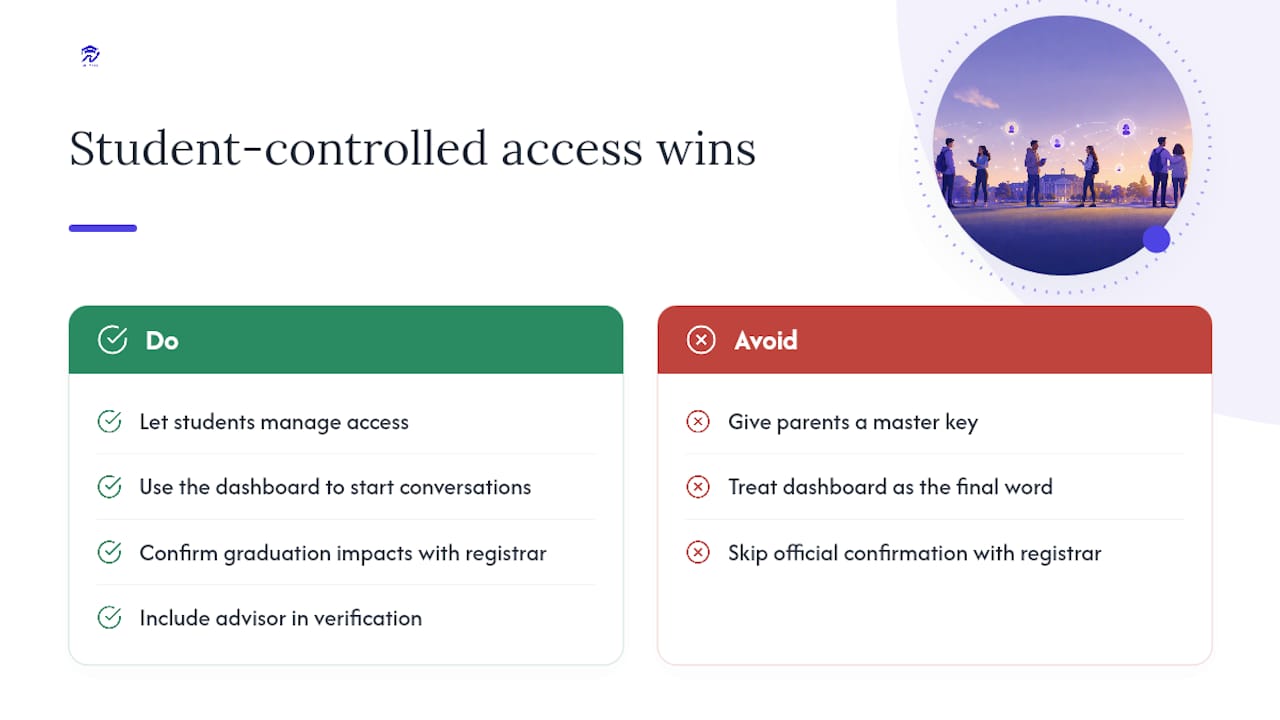
Handing parents a master key to a student’s academic record sounds convenient until you consider what it actually teaches. College is the first place most students manage their own official records, and a proxy system that forces them to decide what to share, and with whom, is doing something useful beyond privacy compliance. It’s practice for adult life.
The families who navigate this well tend to treat the shared dashboard as a starting point for a conversation, not a substitute for one. Whatever tool you use for shared visibility, verify anything that affects graduation timing directly with your registrar and advisor. No dashboard, including Univyze’s, replaces that official confirmation.
— Ryan
Sources
For the specifics that apply to your campus, start with the U.S. Department of Education’s FERPA guidance and your own registrar’s proxy access page, since steps vary by institution.
- Protecting Student Privacy — must postsecondary institutions provide a parent with access?
- Colgate University — Sharing grades with family (InfoShare)
- Boston University Registrar — FERPA FAQs
FAQ
Can Parents Automatically See a Student’s Degree Plan?
No. FERPA transfers record rights to the student at enrollment, so parents need either student-granted proxy access or a signed FERPA release to view degree plans or transcripts.
What’s the Difference Between Proxy Access and a FERPA Release?
Proxy access gives parents a view-only dashboard for items the student selects, while a signed FERPA release is a separate document that lets staff actually discuss records with a parent by phone or email.
Can a Parent See Billing and Academic Records in One Login?
Usually not. Financial and billing portals typically run separately from academic proxy systems, so a parent may need two different accounts to see both.
Does Univyze Replace My Official Degree Audit?
No. Univyze shows term-by-term sequencing and family visibility, but you should always confirm requirements with your university’s catalog, registrar, and advisor.
How Quickly Can a Student Revoke Family Access?
Revoking access is typically immediate. The student removes the designee or unchecks a shared category in the proxy settings, and the parent’s dashboard updates right away.